
Learn how to make a sweatpants mockup using Mockey AI. Choose from templates or upload your sweatpants image, describe the scene, and download.
Many people who want to make sweatpants mockups face a problem. The design can look nice on the computer, but the real sweatpants look different. Sometimes the sweatpants mockup looks wrinkled or low quality. Some people even spend a lot of money on a sample and later find out their design does not look good on the actual fabric.
This isn’t theoretical. It’s what streetwear brand owners say. So here’s a guide built around that, plus a walkthrough of two ways to make a sweatpants mockup step by step.
Table of Contents
Why Use a Sweatpants Mockup Before Ordering a Sample?
Someone asked a simple question on Reddit: “Is $225 too much money for one sweatpants sample?”
Sweatpants featured embroidery and custom printing on thick fabric. Ordering 50 pairs will cost $26 per pair.
People gave different answers. Some said $225 is normal since the first samples need extra work. Others said it was a bit expensive and that a price between $120 and $180 would make more sense.
It’s impossible to tell the price without seeing it. The cost changes based on where the design goes, how detailed the stitching is, and how big the print is. That is why making a mockup first is important. This shows precisely what you wish, so the factory knows how much to charge.
How to Make a Sweatpants Mockup in Different Ways
We will use Mockey AI to make a sweatpants mockup. Right now, it is one of the best product mockup sites. You get two different ways to create it. Let’s learn how!
Method 1: Using Mockey’s Sweatpants Templates
The fastest way to make a sweatpants mockup is to start from an existing sweatpants template rather than building one from scratch.
Step 1: Create an Account
Make a Mockey account by signing up. Starts from a free plan.
But Mockey’s free plan limits downloads and includes no AI credits. From the homepage, go to Pricing and pick Creator at $19/month. Without it, most of the steps below won’t be usable.
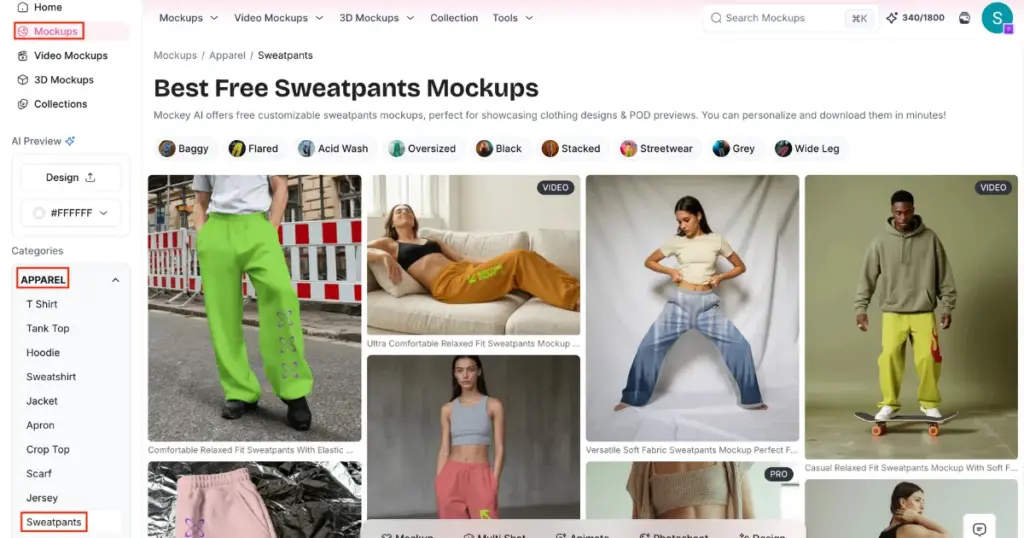
Step 2: Go to Mockups, Then Find Sweatpants Under Apparel
From the main Mockups page, the Apparel category in the left sidebar lists Sweatpants directly. Click into it.
Step 3: Filter by the Style
The sweatpants page has style tags across the top: Baggy, Flared, Acid Wash, Oversized, Black, Stacked, Streetwear, Grey, Wide Leg.
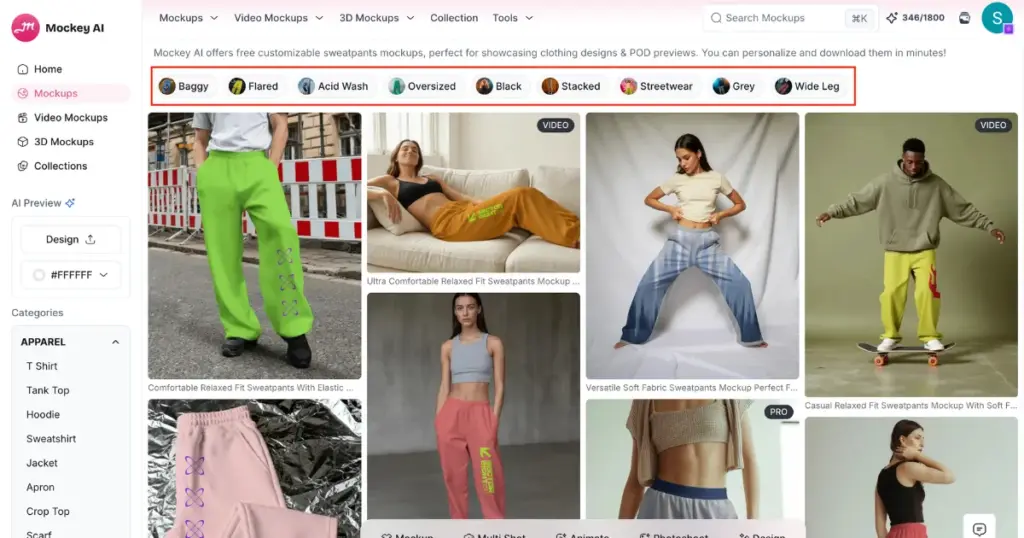
If your product is a specific cut, like the flared style, filter by clicking the flared sweatpants mockup instead of scrolling through every template.
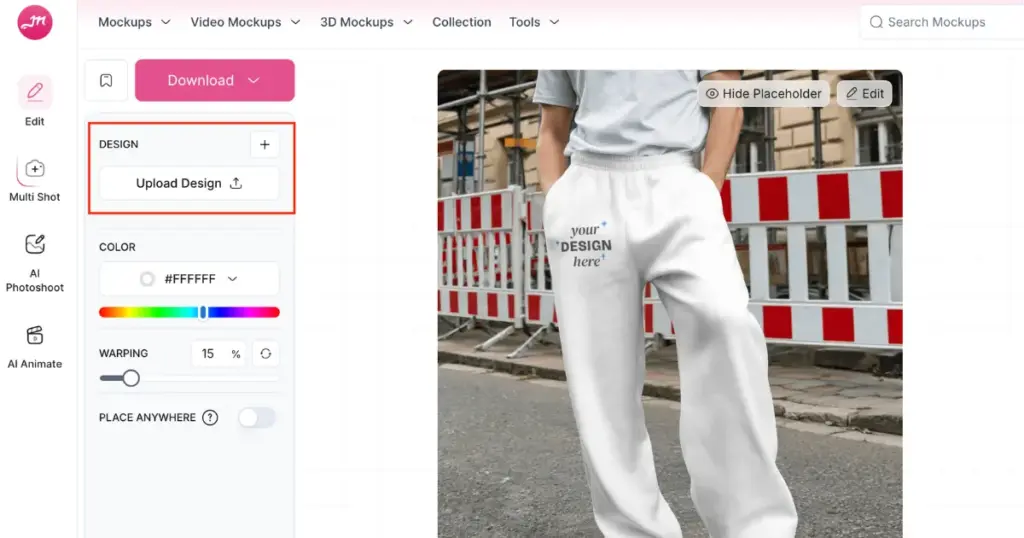
Step 4: Upload Your Design
Open a template and upload your design. Check your design size on the template before moving on.
Step 5: Adjust Color and Warping
The Color picker lets you change the sweatpants color to match your actual fabric, and the Warping slider controls how much your design bends with the fabric folds. Use the Place Anywhere toggle to move your design beyond the template’s default position.
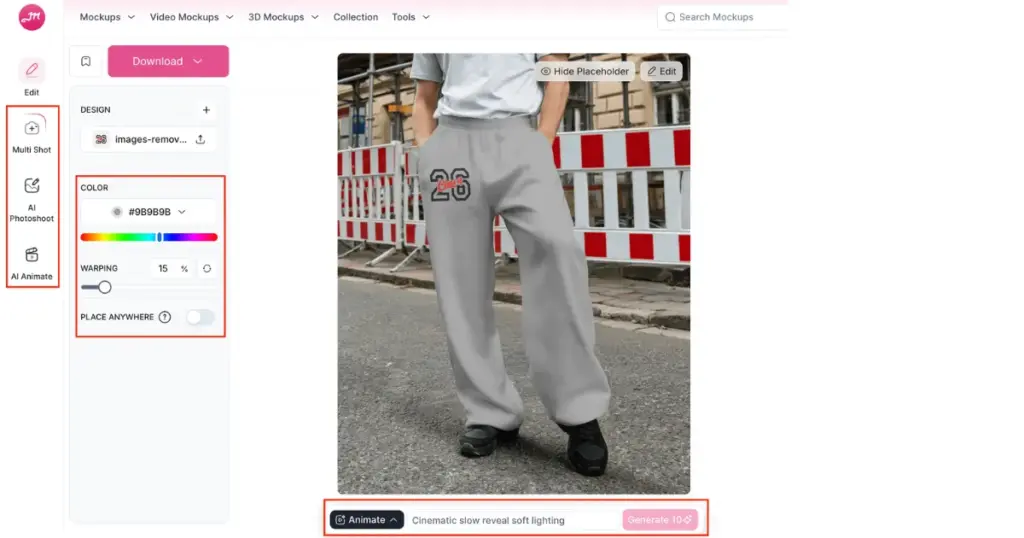
Utilize some AI tools, like:
- Multi Shot (Different angles of your design)
- AI Photoshoot (AI Scene)
- AI Anime (for motion animation)
Step 6: Download in the Size and Format
Hit Download, choose JPG or PNG, then pick 1600×2000px, 800×1000px, or 400×500px depending on where the mockup is going (product page, social post, ad creative).
Method 2: Describing Your Own Mockup With AI Instead of Using a Template
If none of the templates match your exact product, garment, or angle, you can skip templates entirely and describe what you want.
Step 1: Open the Mockup Drawer and Type a Description
Instead of choosing a template, you describe the product and style in a prompt.
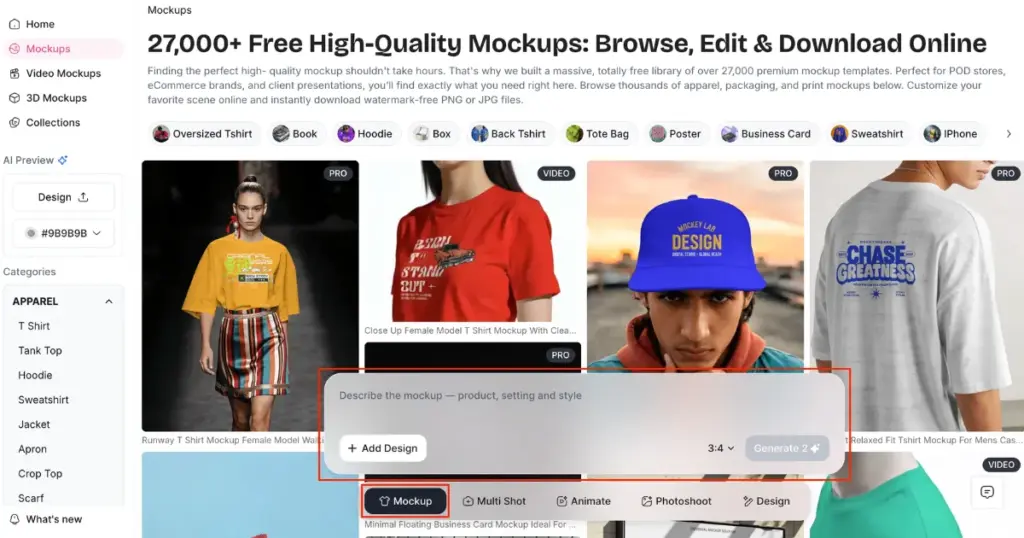
For example
Prompt: Premium unisex sweatpants mockup, straight-leg fit, realistic cotton fleece fabric, clean side view and front view, smooth wrinkles, neutral studio lighting, blank design area on upper thigh, high-detail texture, ecommerce-ready, photorealistic.
This is the same logic as briefing a photographer; the more specific you are about fabric, fit, and lighting, the less you have to fix afterward.
Step 2: Add Design
Click Add Design and upload your artwork, the same “Class of 26” type graphic you’d use in the template method.
Step 3: Pick Your Aspect Ratio and Generate
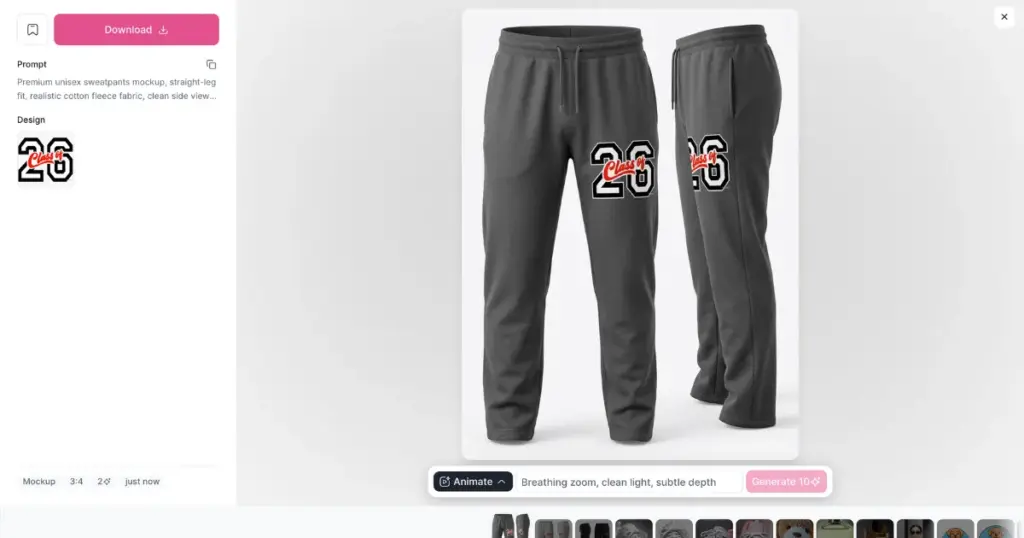
Set the ratio and hit Generate. With one prompt, you can get different views of the same sweatpants, like the front view and side view, instead of one template image.
Step 4: Review and Download, or Animate
Once generated, you get the same Download options as before, plus the option to run it through Animate if you want a short video version.
What Gets Criticized in Sweatpants Mockups?
Let’s look at the main points people shared:
1. Bad Lighting and Wrinkled Sweatpants Mockups
Some cheap sweatpants mockups do not look very good. The clothes may be wrinkled, the design may be misplaced, and poor lighting can highlight mistakes.
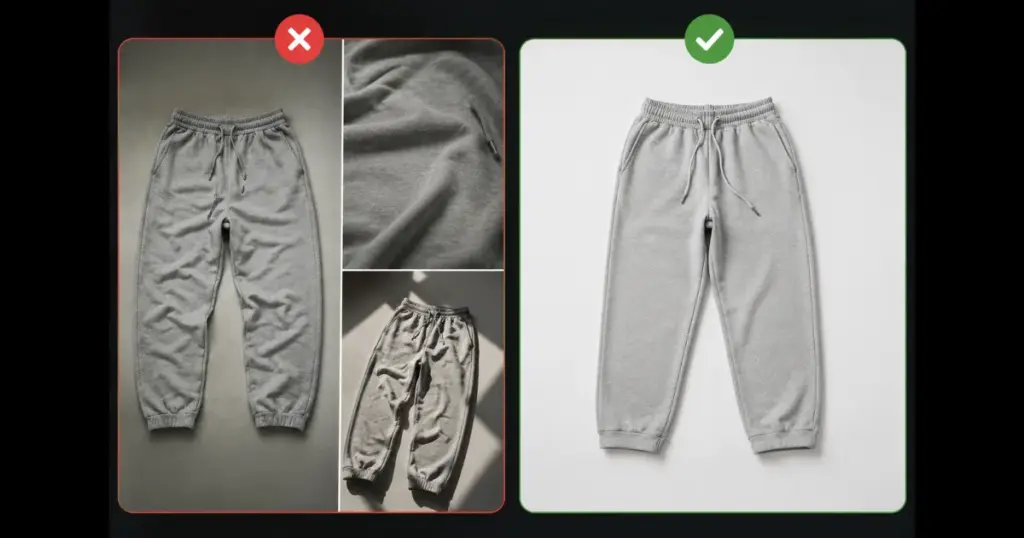
Some mockup packs cost $30, but still do not look realistic. Using a real product photo and fixing small marks with simple editing can sometimes look better and cost nothing.
2. Bad Typography and Layout
Feedback from people praised the color choice and the way the design split across the leg, but called out the font as basic and overdone.
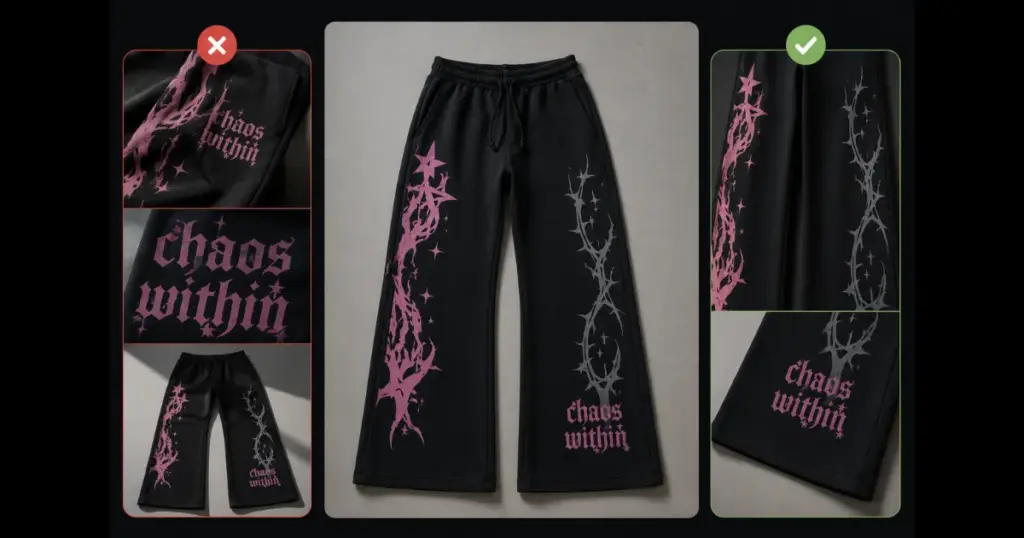
They don’t just look at the design. They also notice fonts, colors, and where everything is placed. So when you make a sweatpants mockup, take your time and make it look good.
3. Outdated Design
People saw the sweatpants and wondered what made them different and why they cost $100 to $140. The mockup made the sweatpants look nice, but a nice mockup cannot fix a weak design. After looking at it for a few seconds, people still wanted a good reason to buy it.
Conclusion
People do not care much about which sweatpants mockup generator you use. They care about how your product looks. If the text is hard to read, the design looks messy, or the layout is bad, people will notice it right away from the mockup image.
A mismatch between mockup scale and final print size can cost you a $225 sample before you find out. Before selling your product, always check the mockup carefully. It is much easier and cheaper to fix mistakes at this stage than after the product is already for sale.
FAQs
Why does my printed sweatpants design look different from the mockup?
Mockups are shown at one fixed size, but sweatpants come in a range of sizes and leg widths. A design that looks proportional on the mockup can scale differently across a real-size run.
Should I get a physical sample before or after making a sweatpants mockup?
After. A clean mockup lets you lock in placement, scale, and color before you pay for a sample.
What sweatpants styles can I filter for in a mockup tool?
Common style filters include Baggy, Flared, Acid Wash, Oversized, Black, Stacked, Streetwear, Grey, and Wide Leg, useful if your product is a specific cut rather than a generic style.
Can I generate a custom mockup angle if no template matches my product?
Yes. Instead of picking from existing templates, you can describe the product, fabric, fit, and lighting directly in a text prompt and generate a custom mockup, including front and side views from a single description.