

In Bendito Mockup vs Mockey AI, use Mockey to get a genuine free plan, a huge number of video styles, and a better interface to edit mockups online.
Let’s compare Bendito Mockup vs Mockey AI and find out which one performs better in different areas in this blog post.
Table of Contents
A Quick Verdict
Overall, Mockey AI is better than Bendito Mockups. This is because Mockey AI lets you edit mockups online, offers a large number of templates for both static and video mockups, has more than 60 products, and provides a free plan without any watermark. It also includes additional features such as 3D mockups, mockup collections, seasonal theme products, and custom mockups.
Let’s take a closer look at both platforms and understand how they work.
What are Bendito Mockup and Mockey AI?
Bendito Mockups and Mockey AI both help users create mockups, but in different ways.
Bendito Mockup offers PSD mockup files you can edit in Adobe Photoshop. There is no built-in editor on this platform. You have to pay for each mockup you download.
On the other hand, Mockey AI offers pre-made templates with a built-in editor for uploading designs and customization. You can start for free or purchase a monthly or yearly plan to use it.
Let’s talk about the process for creating a mockup using both platforms.
| Step | Bendito Mockup | Mockey AI |
| Step 1: Choose Mockup | Select a PSD mockup file from the library | Choose a ready-made mockup template directly online |
| Step 2: Download | Download the PSD file (paid per mockup) | No download needed |
| Step 3: Open Tool | Open the file in Adobe Photoshop | Works in browser |
| Step 4: Add Design | Locate smart object layers and insert your design manually | Upload your design with one click |
| Step 5: Customize | Adjust layers, shadows, and effects manually | Use the built-in editor (change color, warping & multi-shot feature, convert mockup to animation) |
| Step 6: Preview | Preview inside Photoshop | Instant live preview |
| Step 7: Export | Export manually from Photoshop | Download instantly as PNG/JPG or video |
Bendito Mockup vs Mockey AI (A Full Comparison)
We will compare Bendito Mockup vs Mockey AI based on their pricing, product variety, video options, and additional features. Let’s start with pricing.
Pricing
Let’s begin by discussing the price of Bendito Mockup.
Bendito Mockup Pricing
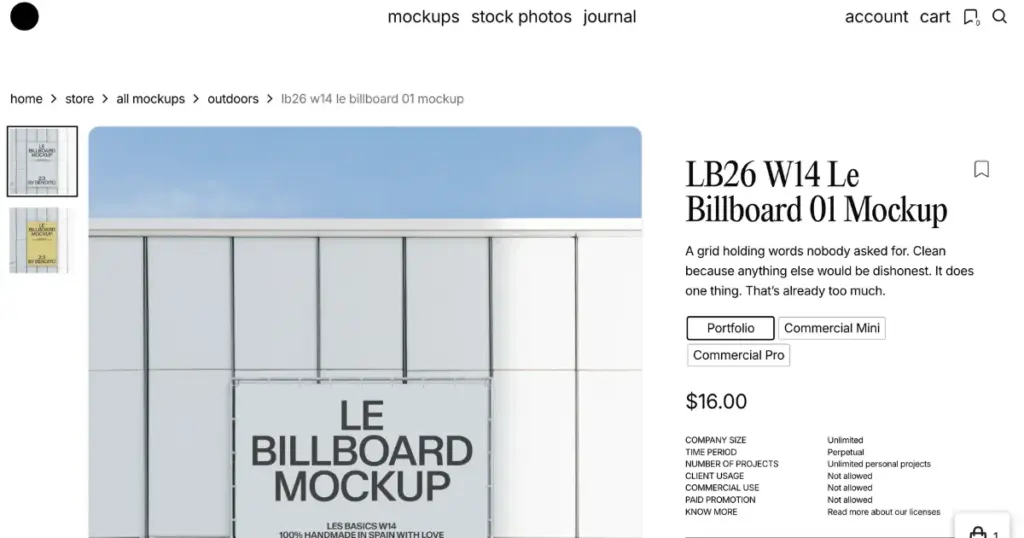
Bendito Mockup has two options:
- Freebies: Over 70 free mockups available.
- Paid: To download each PSD mockup, you must pay. Prices start from $16 for portfolio use, and for commercial use, they can go up to $199.
Mockey AI Pricing
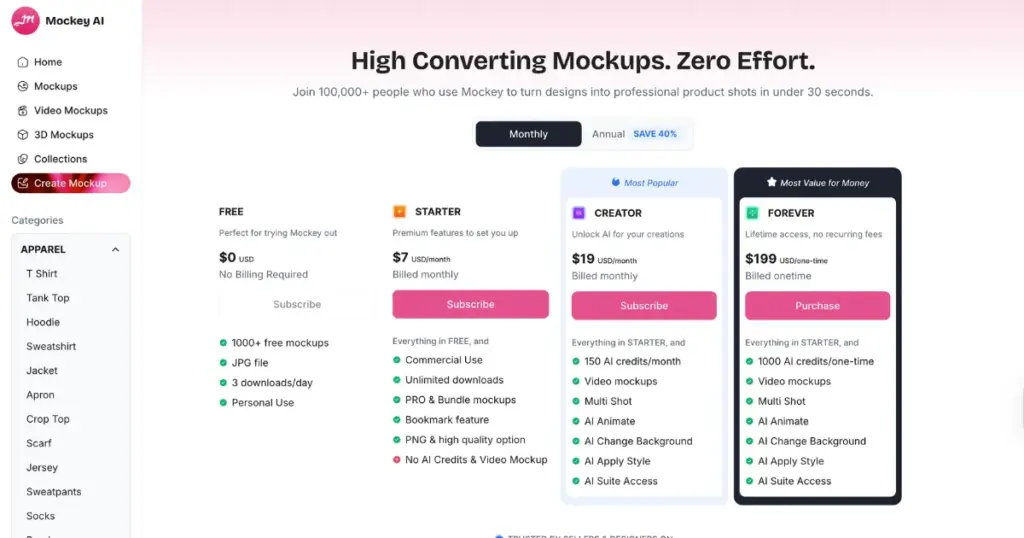
Mockey AI offers a free plan that lets you download up to 3 mockups per day without any watermark. You also don’t need to provide any credit card information to use it.
Talking about the paid plans, pricing starts at $7 per month, which gives you full access to all mockups. If you choose the yearly plan, the cost drops to $4.1 per month.
There is also a Creator plan priced at $19 per month, which gives you access to video mockups and credits to use AI tools. With the yearly plan, this reduces to $12.4 per month.
Verdict
When comparing pricing between Bendito Mockup and Mockey AI, Mockey AI is the winner because it is much more affordable.
Bendito Mockups is a paid service, and you’ll also need a Photoshop subscription separately. Mockey doesn’t charge per mockup, and full access starts at just $7 per month. In this, you get unlimited downloads, PNG files, and access to all templates.
Product Options
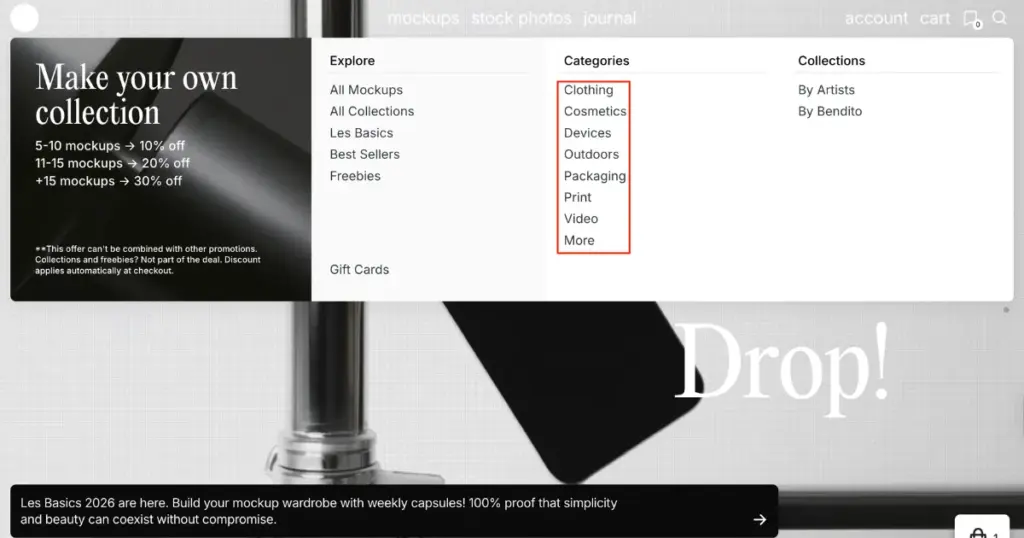
On Bendito Mockup, you get 6 product categories such as clothing, cosmetics, devices, outdoors, packaging, and print. In total, there are around 2,400 ready-made templates.
In Mockey AI, there are 9 product categories, and the total number of templates is over 24,500. Let’s look in detail at how many templates are available in each product category.
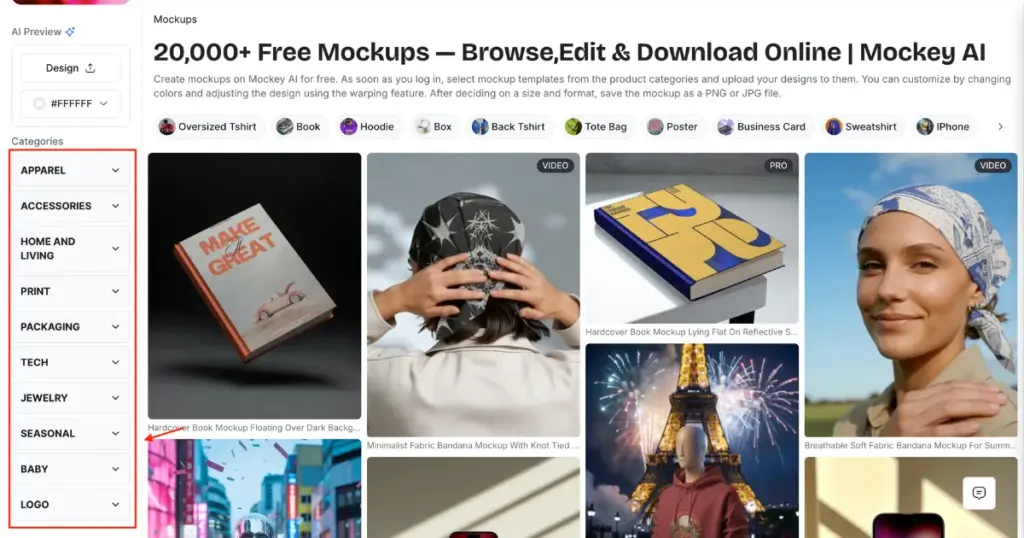
| Bendito Mockup | Mockey AI |
| Clothing (290+) | Apparel (6400+) |
| Cosmetics (140+) | Accessories (1700+) |
| Devices (320+) | Home & Living (1600+) |
| Outdoors (150+) | Print (8100+) |
| Packaging (500+) | Packaging (3000+) |
| Print (800+) | Tech (2900+) |
| Jewelry (310+) | |
| Baby (280+) | |
| Logo (50+) |
Verdict
Mockey is the winner in terms of product variety and number of templates as well. Compared to 2,400 templates in Bendito Mockup, Mockey AI offers more than 24,500 mockups. It is far ahead in product variety, too. For example, Bendito Mockup does not offer logo mockups, jewelry mockups, sweatpants mockups, lanyard mockups, or even baby products, whereas Mockey AI provides all of these in a wide range.
Video Mockups
Bendito Mockup and Mockey AI both offer video mockups, but there is a big difference between the two platforms.
In Bendito Mockup, you get only 10 video mockups for products like business cards, iPhones, posters, MacBooks, etc., which is very limited. Also, their videos are not very attractive or creative—something users would want to pay for.
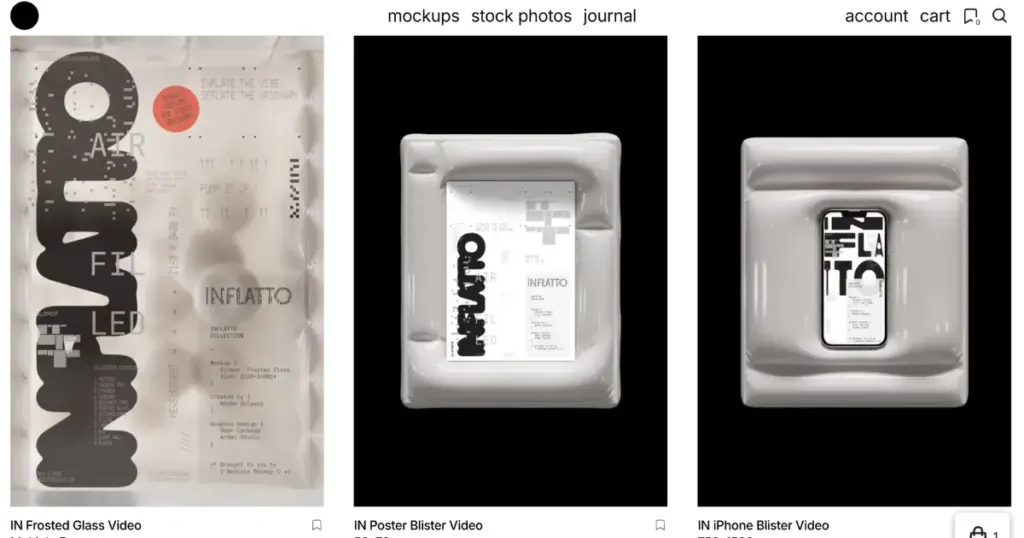
But that’s not the case with Mockey. Its video mockup generator offers more than 4,600 video templates across 60+ products. You just need to select a video template, upload your design, and your video is generated within seconds on the same platform. You also get videos with different models and outdoor locations.
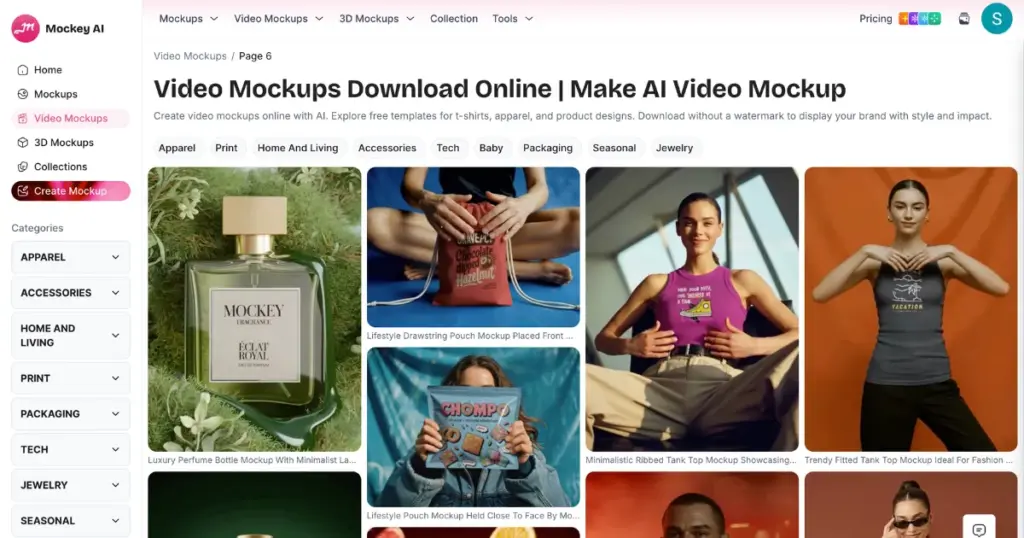
To use this feature, you need to purchase the Creator plan, which costs $19/month and gives you 150 credits.
Verdict
Mockey AI is the winner when it comes to video mockups between Bendito Mockup vs Mockey AI. From the number of video templates to faster output and more affordable pricing, Mockey offers better value. In Bendito Mockup, you have to pay $24 for each video mockup, and the designs are not very creative. So for video mockups, choose Mockey only.
Additional Features/Tools
In Bendito Mockup, you won’t see any additional features or tools. But on Mockey AI, many tools are very useful for POD sellers and eCommerce businesses.
3D Mockups
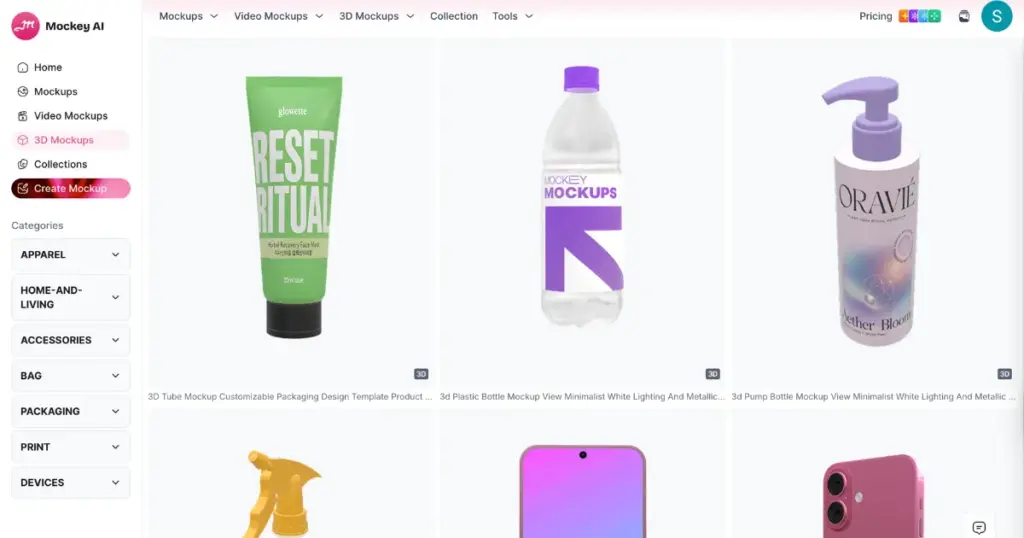
Here, you get many 3D templates for different products. You can show your design to buyers in a three-dimensional preview.
Custom Mockup
Want to add your design to your own product images? Use Mockey’s custom mockup. Just upload your product image, add your design, adjust it using highlight and opacity options, and download it as a PNG.
Multi Shot Feature
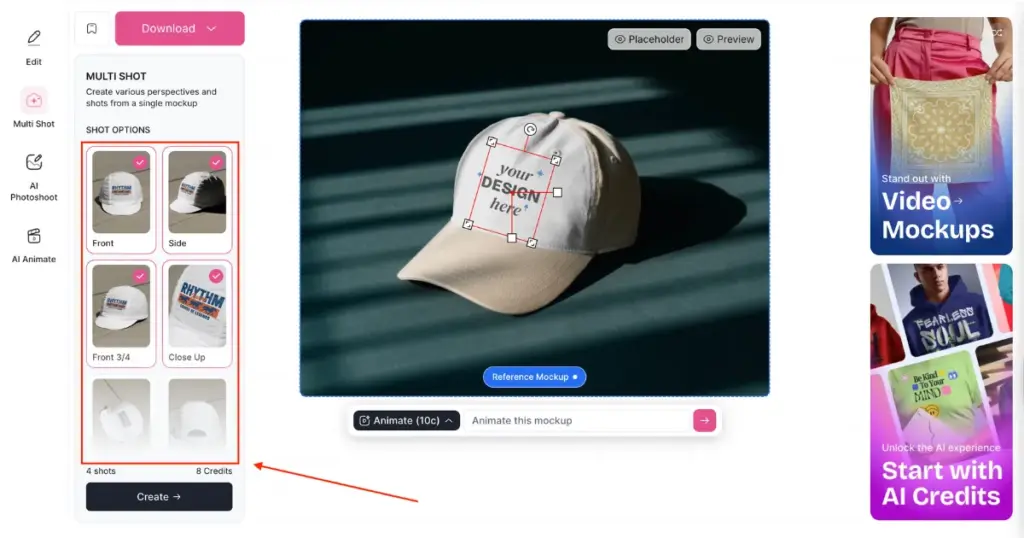
You can create multiple angle variations of one mockup using the Multi Shot feature. You get more than 12 perspectives, like front, back, close-up, 3/4 view, etc. You can download them in bulk.
Seasonal Theme Products
You can use themed products based on festivals like Halloween, Valentine’s Day, New Year’s Day, or Christmas. These seasonal mockups are available even in the free plan, so you can download them without paying.
Mockup Collection
Mockup Collection is a group of templates arranged by a specific theme. You can explore styles like all-over print, everyday wear, essential urban, sunlit display, and many more.
Conclusion
In Bendito Mockup vs Mockey AI, Mockey AI is better in every area—whether it’s product variety, video-style mockups, pricing plans, or even additional features.
Bendito Mockup can be afforded by large businesses, but for startup brands and POD sellers, Mockey AI is the best platform.
So, visit Mockey today and start creating mockups. If you’re starting a POD business, its mockups are perfect for product listings. The Multi Shot feature is especially powerful for attracting buyers.
FAQs
Is Bendito Mockup better than Mockey AI?
Bendito offers high-end PSD mockups that are very aesthetic. Mockey AI is fast, offers a large number of pre-made templates with an in-built editor. If you’re a designer who loves Photoshop control, use Bendito Mockup. If you want speed and zero effort, Mockey AI wins.
What are the complaints about Bendito Mockup?
Users complain that Bendito Mockup is expensive for beginners, requires Photoshop skills, and has poor video mockups.
Can Mockey AI compete with Bendito mockup quality?
Compared to Bendito Mockup, the premade templates in Mockey AI provide much better quality of mockups. Even at the time of download, it delivers high-resolution results.

