The Best AI Tool to Remove Background in 2026
Mockey AI’s Remove Background is the best AI tool to remove background. Drag and drop the image and turn the background transparent or white.
People recommend it when they want a quick cutout without using lasso tools or spending an afternoon in Photoshop. Mockey.ai offers an AI image background remover tool that gets you a transparent cutout fast with a credit subscription.
Let’s learn how to use it, why it’s the best AI tool to remove background, key features and price plan.
Table of Contents
Which is the Best AI Tool to Remove Background?
If speed matters and you want quick results for product images, Mockey.ai’s Remove Background is the best AI tool to remove background from images.
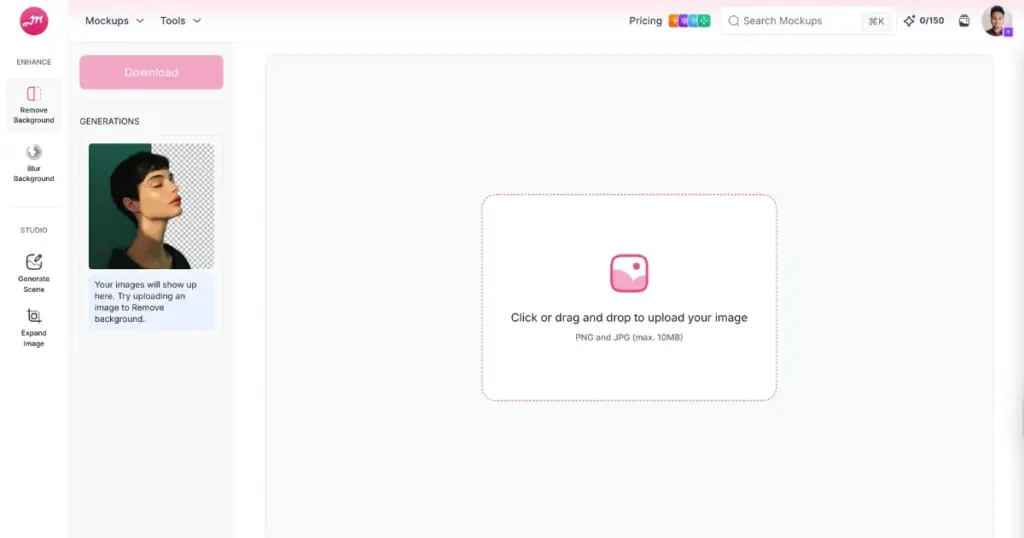
You upload an image or drag and drop, and the AI detects the foreground, removes the background, and gives a transparent or white PNG. No manual tracing and fiddly masks are needed. For many images, the result is good enough to ship as a product photo or a social post without touching it further.
Instead of spending ten minutes selecting hair and edges manually, you wait five seconds and move on to the next task. It’s the difference between doing the chore and getting the chore done.
Mockey.ai’s Remove Background tool supports large images (up to 10MB) and gives high-resolution PNGs by default.
Why People Use Mockey AI’s AI Image Background Remover?
Here are the reasons why people are using this best AI background remover:
1. Speed
Instant results for many photos. There is no need to play around with the selections.
2. Accuracy
The tool works well for faces, people, and standard product shots – even hair and fur are usually well captured.
3. Simplicity
Drag & drop and download. Even non-designers can do it.
4. Transparent or White Background
With a single click, you can choose whether you want a transparent background or a white one, and it will instantly deliver the result.
5. Excellent in Complex Scenes
You get perfect edges even if the foreground and background have similar colors, or the foreground is semi-transparent.
How to Remove Background in Mockey AI (Step-by-Step)
We’ve already shared a step-by-step guide on how to remove the background with AI. Still, learn this brief tutorial on how to use Mockey AI to remove the background from images.
- Buy the CREATOR or FOREVER plan.
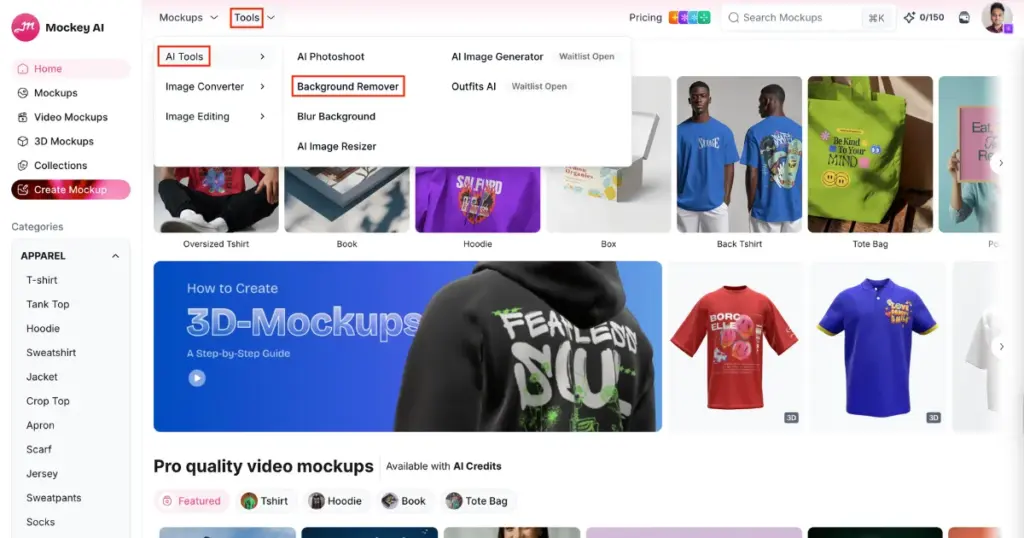
- Follow “AI Tools > Background Remover” under the Tools section.
- Drag & drop your image.
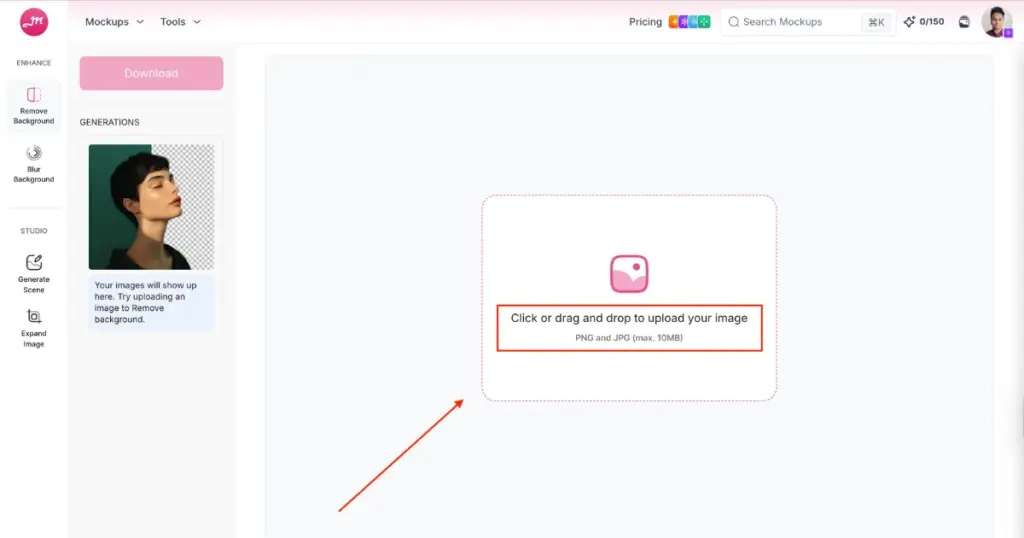
- Select Type.
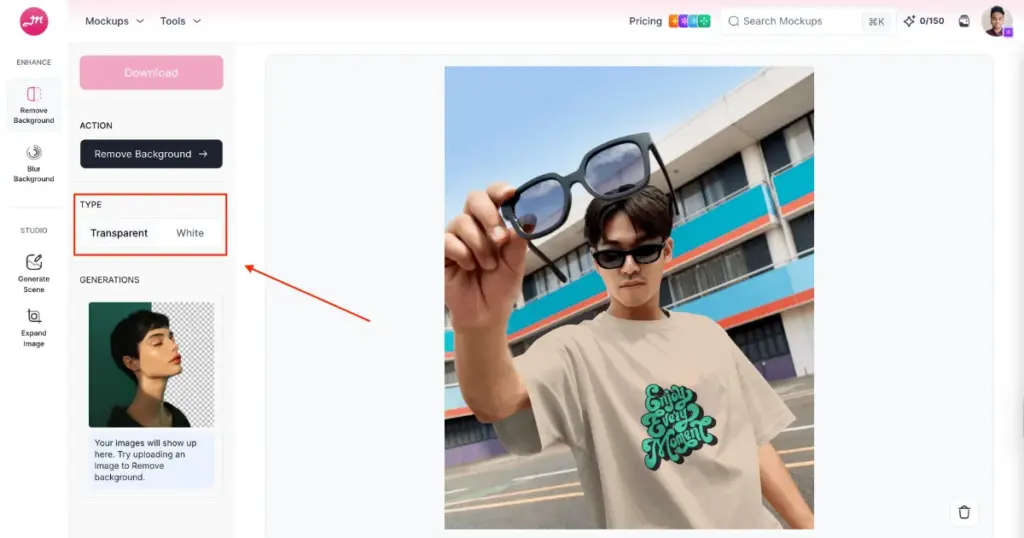
- Click on “Remove Background” to generate.
- Press Download to save the PNG file.
Use Cases of the Background Eraser Tool
Look at some use cases of the background eraser tool:
- Product photos for marketplaces
- Social media creatives
- Mockups
- Rapid prototyping
- Automation
The Pricing Plan
Pricing changes from time to time, so here is the latest pricing page on Mockey.ai.
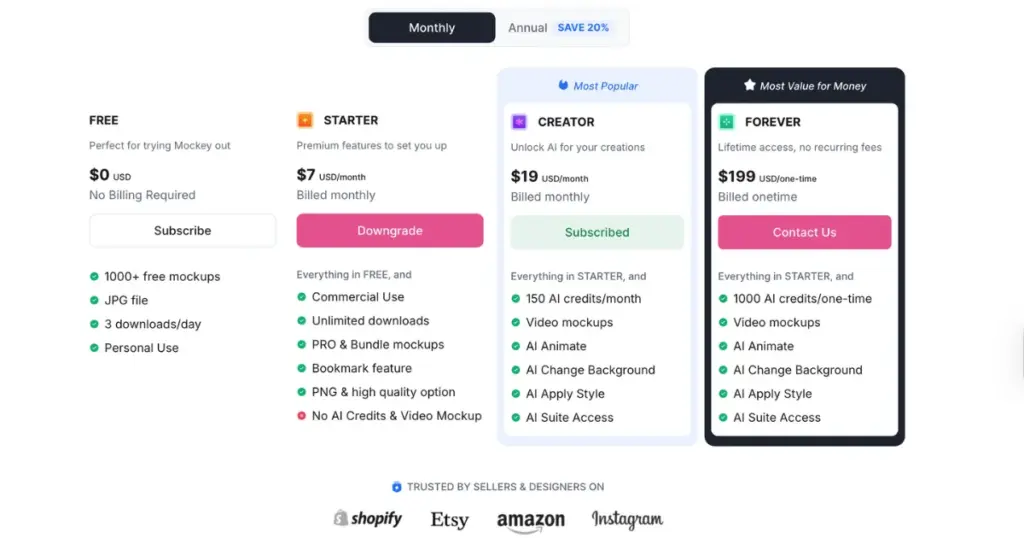
The Background Remover comes under the AI tools, so you’ll need to purchase either the CREATOR plan or the FOREVER plan. The CREATOR plan costs $19 per month and gives you 150 credits. The FOREVER plan gives you 1000 credits as a one-time purchase. Each background removal uses 2 credits. If your credits run out, you can easily top them up.
Along with this, the AI tools also include features like AI Photoshoot, video mockups, mockup animation, and Blur Background.
Side-by-Side Comparison to Other Tools
| Tools | Advantages | Disadvantages | Verdict |
| Mockey.ai’s Remove Background tool | Extremely fast, good accuracy, minimal effort | NA | Wins for fast and good daily work |
| Photoshop | Full control, pixel-perfect edges, best for complex images | Slow, manual work, steep learning curve | Best quality, worst for speed |
| Open-source / Self-hosted | Cheap at scale, full control, better for privacy | Needs setup, infra, and maintenance | Excellent for power users, not beginners |
| Other SaaS tools (Photoroom, Clipdrop, etc.) | Similar AI quality, extra editing features | Pricing varies, not always cheaper | Pick what fits your workflow |
Conclusion
If you want fast and high accuracy, Mockey.ai’s Remove Background is one of the best AI tools to remove background. It’s best for everyday uses like product images, mockups, socials, and prototypes. Use this best background remover website to validate visuals and produce quick product images.
FAQs
What is Mockey AI’s Remove Background?
Mockey AI’s AI image background remover is an AI tool that automatically removes image backgrounds in seconds. You upload an image, it detects the subject, and gives you a transparent background without manual selection.
Is Mockey.ai’s Remove Background tool safe?
The official Mockey AI website and its AI tools are safe to use. They focus on user privacy, do not keep images for long, and follow data protection rules.
Is Mockey.ai’s Remove Background better than Photoshop?
The two serve different purposes. Mockey.ai’s Remove Background is built for speed and ease, getting the job done in seconds. Removing background in Photoshop is about precision and complete control.

Sangram Sahoo
I’m a content writer with 4 years of experience. I specialize in creating practical content around mockups, print-on-demand, apparel, and e-commerce design.
