The Best AI Tool to Animate Static Mockups in 2026
Mockey AI is the best AI tool to animate static mockups. Its Bring to Life feature will turn the mockups into an animation.
Mockey AI has a feature that lets you turn static mockups into animations. A prompt can also be used to describe changes, such as adding new elements or changing the background. Let’s talk in detail about this AI mockup generator.
Table of Contents
Which Is the Best AI Tool to Animate Static Mockups?
Many tools claim they can convert static mockups into animations. But most of them are very complicated, not user-friendly, and their plans are extremely expensive.
Is there an affordable tool that generates animated mockups with just one click that looks attractive and doesn’t have any flaws?
The answer is Mockey AI. With affordable pricing, you can upload your design to any product mockup and convert it into an animation using the “Bring to Life” feature.
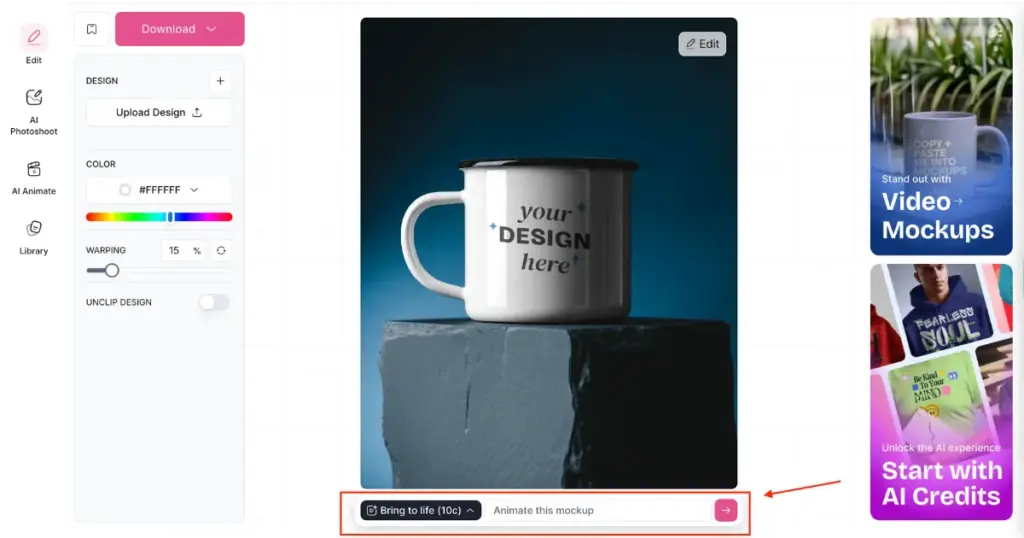
For example, you want to convert a mug mockup into an animation. What will you do? While creating a mockup, you’ll find the “Bring to Life” feature on the same editor page. Just click the arrow icon, and your static mockup will turn into an animated one.
The CREATOR plan costs $19 per month, and you get 150 AI credits every month. The output quality is very high.
How to Turn Static Mockups into Animation (Step-by-step)
By the way, we recently published a blog on how to create animated mockups, where we explained everything in full detail. In this section, too, we will discuss it step by step, but in a brief way. This is a step-by-step tutorial on how to convert static mockups into animations.
- Click the “Pricing” button. Select from the CREATOR or ELITE plan. Your Mockey AI account will be created automatically.
- Then, click “Mockups”.
- In the Categories, select a product.
- Choose from different templates.
- Click “Upload Design”.
- Edit it.
- Once your customization is complete, look for the “Bring to Life” feature.
- Click the Arrow button. Or you can describe the change you want and click it.
- Your animated mockup will be saved.
Alternative Method to Generate Animated Mockups
You can also create animated mockups using another method, that too with the help of templates. There is an AI tool called AI Anime. As soon as you click on it, you will see six different animated templates.
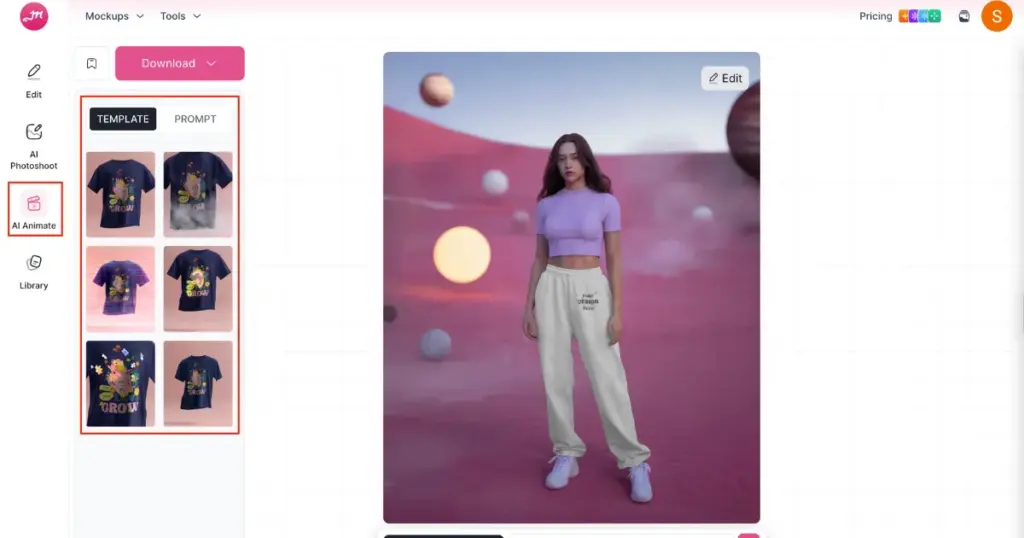
If you want mockups in that same style, just select it and generate. You can also use prompts here if you want to make some changes.
Conclusion
No matter how many new platforms come, Mockey AI will always remain the best AI tool to animate static mockups. That’s because it creates animations in two ways. First, using templates with the AI Anime tool, and second, using the Bring to Life feature, where you can also use prompts. So don’t wait, purchase a plan now and start generating animated mockups.
FAQs
Do I need to purchase a plan to convert mockups into animation?
Yes, if you want to convert static mockups into animation, you need to purchase a plan. With the CREATOR or ELITE plan, you can use the Bring to Life feature, which makes animation possible.
What tools are offered in Mockey AI’s CREATOR plan?
When you purchase the CREATOR plan, you get access to Video Mockups and AI tools like AI Photoshoot, AI Anime, and the Bring to Life animation feature.
Can I animate all products?
Yes, you can animate all available products. Whether it’s tote bag mockups or any type of packaging mockups, everything can be converted into animation.

Sangram Sahoo
I’m a content writer with 4 years of experience. I specialize in creating practical content around mockups, print-on-demand, apparel, and e-commerce design.
