Modern T-shirt Design Placement Guide
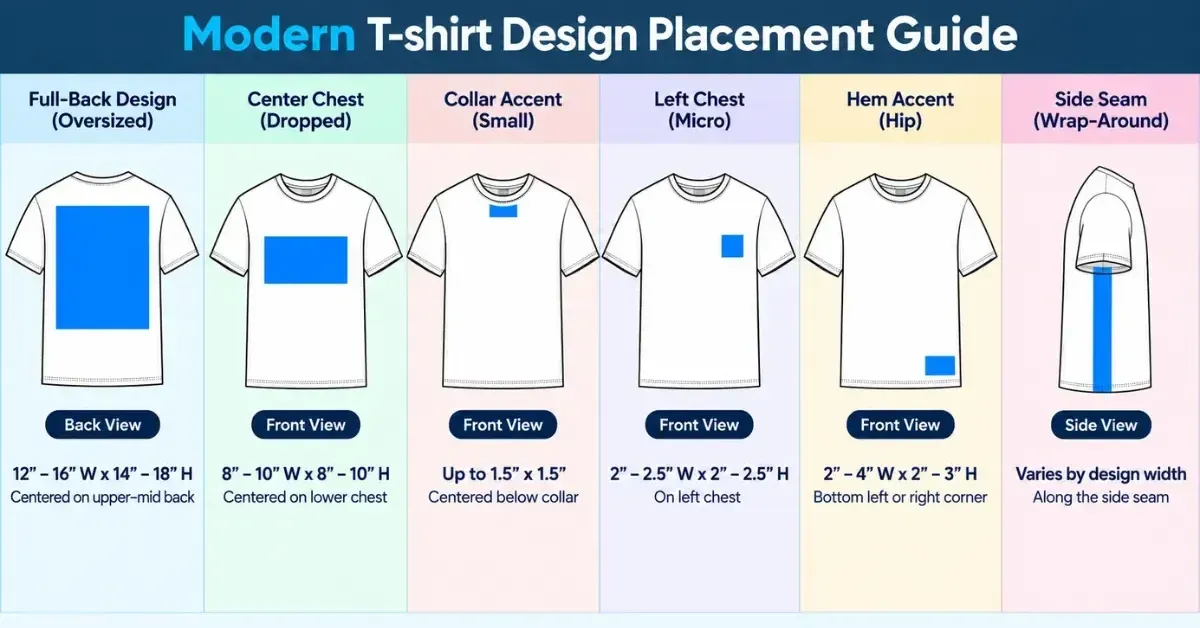
Learn the T-shirt design placement guide for accurate front, back, chest, collar, bottom, and side prints. Verify sizes visually with mockups.
Apparel trends now lean toward oversized fits and boxy cuts. As a result, design placement is moving beyond traditional standard positions.
Modern shirts have dropped shoulders and wider chests, so standard measurements can make graphics look off.
Table of Contents
The T-shirt Design Placement Guide
Here is a guide to help you place your T-shirt design.
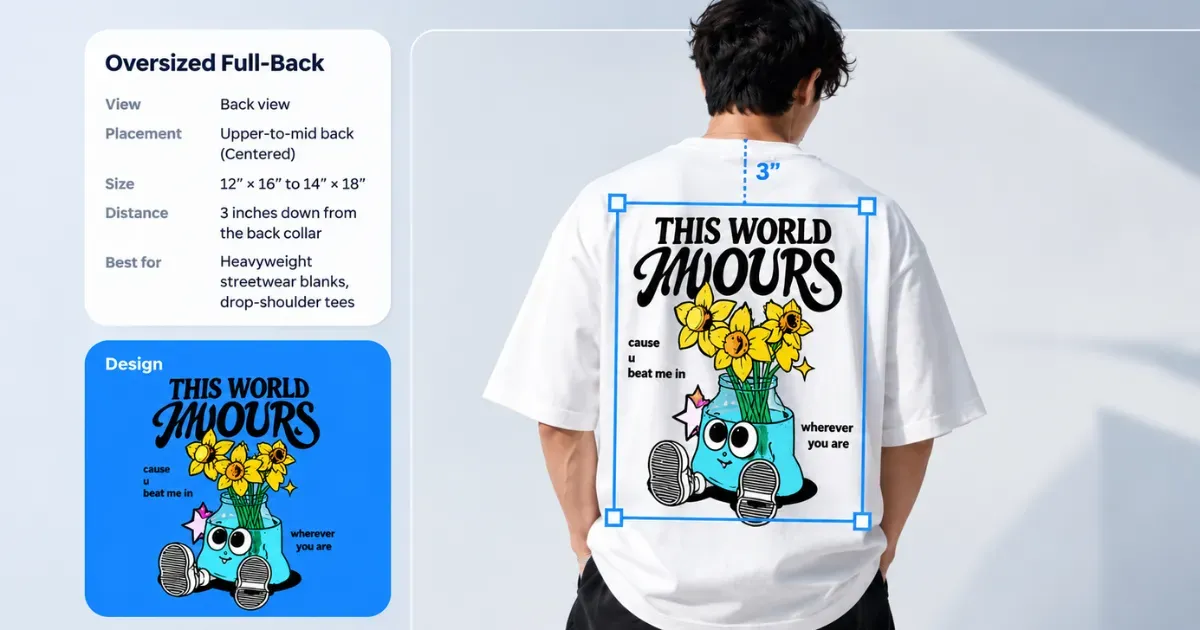
1. Oversized Full-Back Print
The front stays blank or has a small logo. The back carries the main design like a full-size poster.
Use artwork around 12" × 16" to 14" × 18".
Place the top edge 3" below the back collar seam for a balanced fit across the shoulder blades.
2. Dropped Center-Chest Print
Modern tees are wide and boxy, with dropped shoulders. A standard print can sit too high and look awkward.
Use an 8" × 8" to 10" × 10" square or rectangle. Place it 4–5" below the front collar.
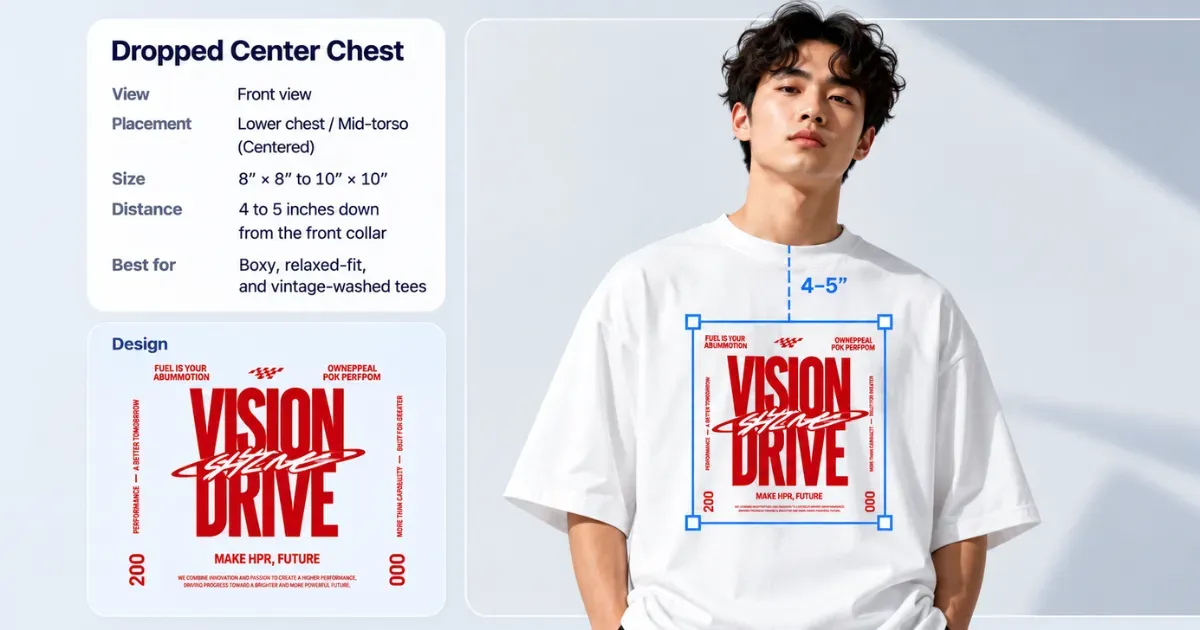
This lower placement keeps the print sitting naturally on the chest instead of crowding the neck.
3. Collar Detail Print
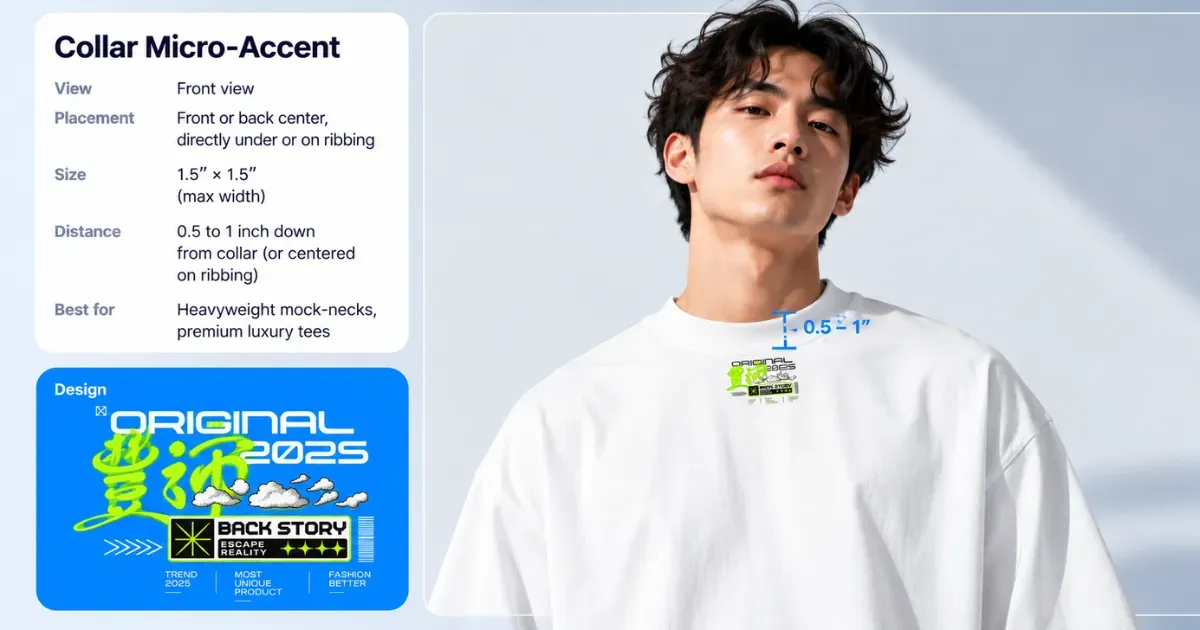
For a high-end techwear look, keep the design small.
Use a word or logo no wider than 1.5".
Place it 0.5–1" below the collar. Some printers can also apply it directly to the ribbed collar for a subtle finish.
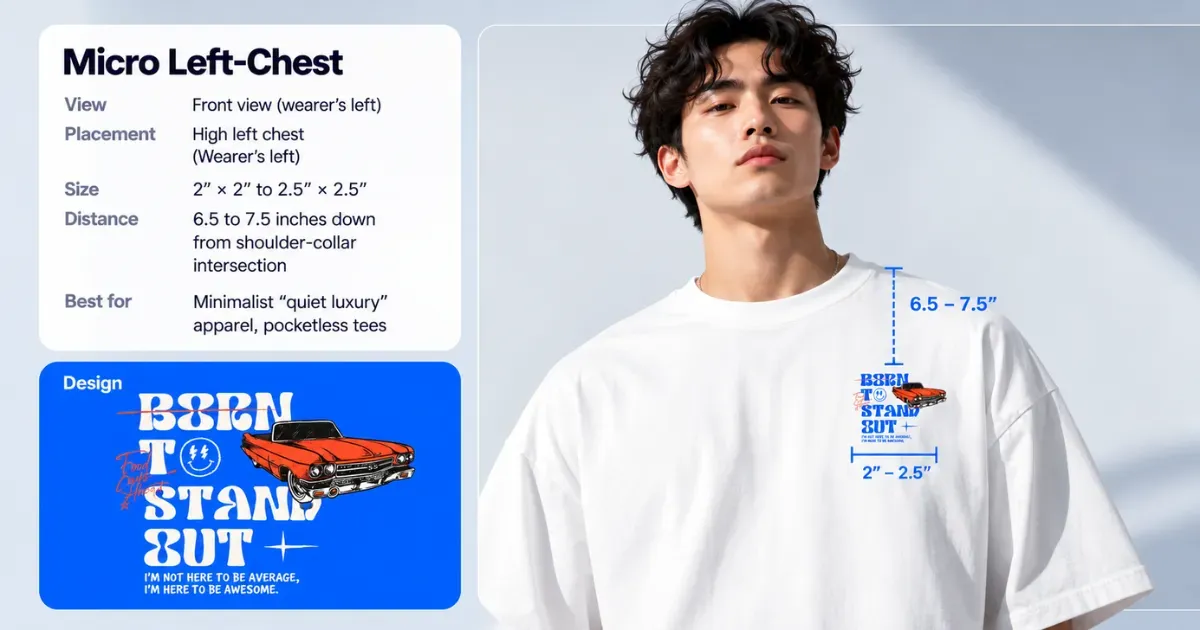
4. Tiny Left-Chest Logo
A modern take on the classic left-chest logo.
Keep it small, around 2" × 2" to 2.5" × 2.5". Start 6.5–7.5" below the shoulder-and-collar seam.
5. The Bottom Corner Print
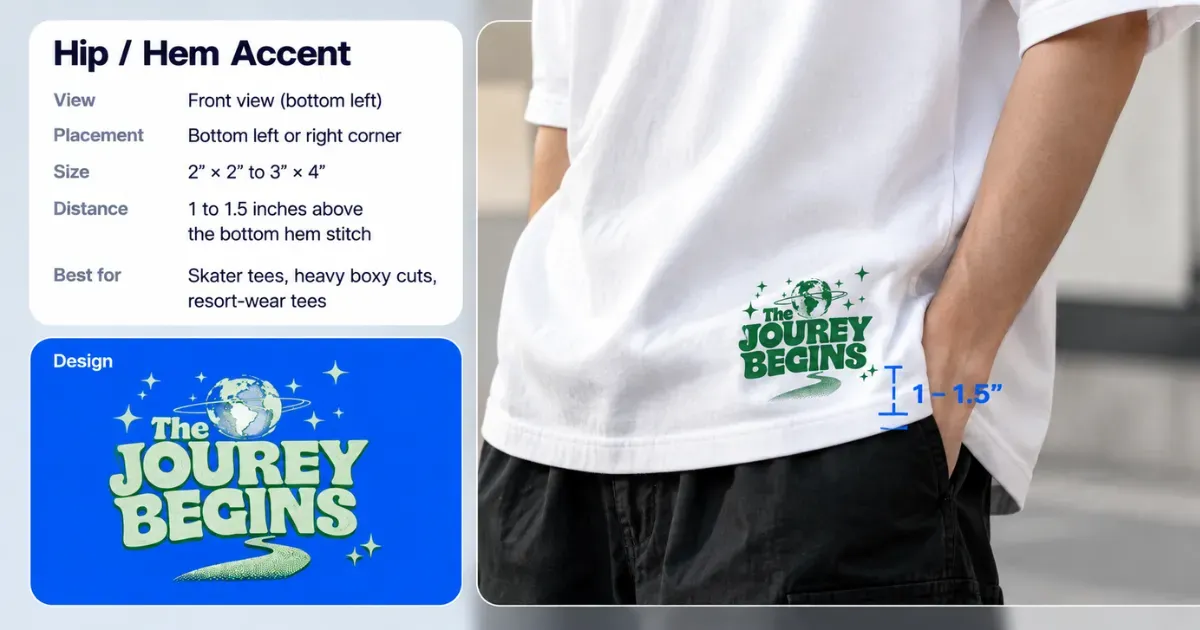
For skater, surf, and underground streetwear, try a small graphic near the hem.
Keep it around 2" × 2" to 3" × 4". The bottom hem should be 1–1.5" above. It adds a subtle detail that stands out when you move.
6. The Side Print
A premium streetwear look where the graphic flows from the front, across the ribs, and onto the back.
The design crosses the side seam, so a standard heat press won’t work well. Use a professional DTG printer or custom cut-and-sew production instead.
T-Shirt Print Placement Rules That Prevent Errors
T-shirt production has a few hidden danger zones and alignment details that can prevent costly printing errors.
Knowing these physical layout rules helps keep every shirt consistent across your inventory.
A. Avoid Belly Areas
The apparel industry calls this the “Belly Zone”. Place a graphic too low, and it lands directly on the stomach.
When the wearer moves or sits, the fabric folds around the stomach. A low design placement can warp, distort, or make the artwork look saggy.
Keep the design focused on the upper chest. It stays flatter and easier to read when sitting or moving.
B. The 4-Finger Placement Rule
When checking shirts by hand, you won’t always have a ruler. Use the 4-finger rule as a quick guide.
Place your hand under the collar. For standard fits, start the design around your pinky.
For dropped or boxy fits, use 5–6 fingers to place the design lower.
C. Locate the Exact Center
Loose shirts aren’t always perfectly flat, so eye-centering can be off.
Fold the shirt in half, matching the sleeve seams. Press it for 3 seconds to create a temporary center crease.
Line your design up with the crease for accurate centering every time.
D. Avoid Collar Seam Pressure Traps
If you’re pressing shirts with a heat press, the thick collar seam can cause uneven pressure. The platen hits the collar first, leaving a gap below it. That can make the transfer peel after washing.
Thread the shirt onto the lower platen so the collar hangs off the edge. You can also use a foam pressing pillow inside the shirt to lift the print area above the collar seam.
E. Balance Your Chest Graphic
Orient the graphic center to the collar center. Don’t measure from the armpit seams, as shirt sizing can vary.
The collar gives you a more reliable visual center.
Alright. You understood t-shirt design placement guidelines completely. Now learn how your design will fit before you print it.
Know How Your Design Will Fit Before Printing
Product mockups help you avoid wasted inventory, money, and poor-looking designs.
For modern fits, like oversized or boxy cuts, mockup templates provide a more realistic view.
Use a free mockup generator like Mockey AI that offers features like design warping and the ability to place your design anywhere on the product.
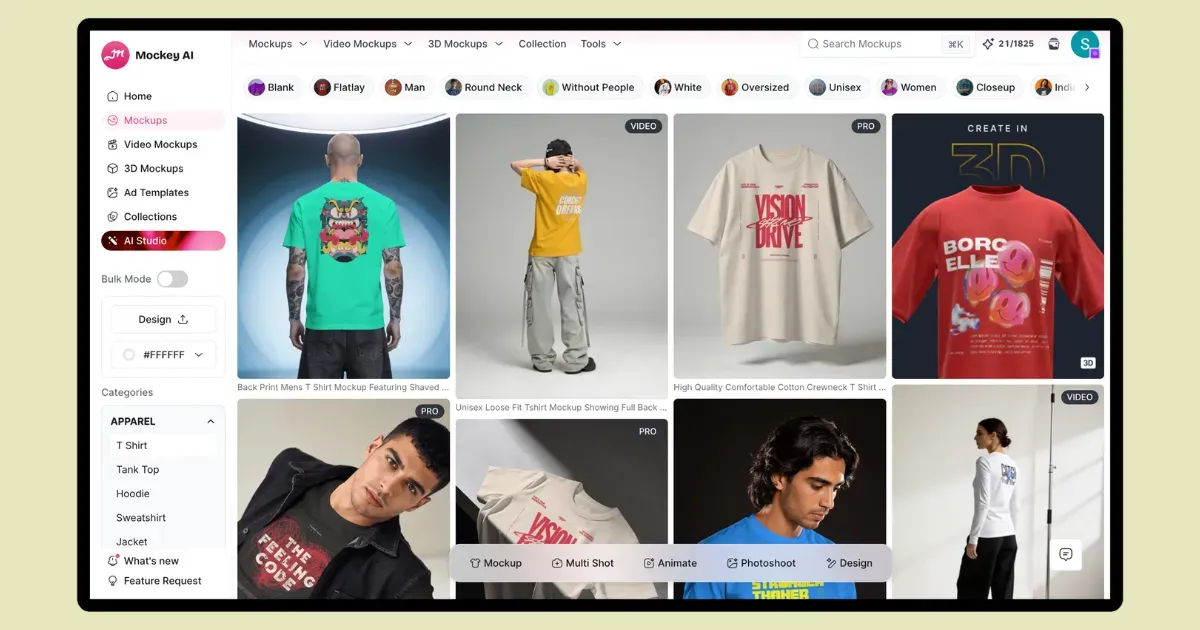
To customize:
- Log in or create an account.
- Click on “Mockups” for templates.
- Look for Apparel and click on T-shirt mockup.
- Upload a design.
- Resize it and use warping and the Place Anywhere feature.
- Export as a PNG or JPG file.
FAQs
What is the back T-shirt design placement guide?
A back T-shirt placement guide shows where to position and size your design. Upper-back prints start 3–4 inches below the collar. Full-back designs typically start about 3 inches down.
What is the best way to put the design on a T-shirt?
Screen printing is best for bulk orders, DTG printing is best for one-off shirts with detailed, colorful designs or photos, and heat transfer is great for home printing with an iron or heat press.
Where to place t-shirt design?
Place your full-front design 2–3 inches below the collar. Keep it centered.
Should I use a mockup generator to preview design placement?
Use a mockup generator to check product design placement before printing. It saves time and helps catch alignment or readability issues.

Sangram Sahoo
I’m a content writer with 4 years of experience. I specialize in creating practical content around mockups, print-on-demand, apparel, and e-commerce design.
