How to Create Rotating Product Mockups
Wondering how to create rotating product mockups? Use Mockey’s 3D mockup generator, choose the product you want, and export in rotating animation.
Here is an example:
Listings with 360° video or rotating mockups convert at 4.8%, compared to 2.9% for standard listings. That’s a 65% increase in sales volume.
If a listing gets few clicks and stays unchanged, it can lose visibility. Using 3D rotating mockups helps you refresh listings, test new visuals, and improve conversions while keeping your store fresh.
Let’s get started.
Table of Contents
What Are Rotating Product Mockups?
Rotating product mockups are 3D visuals that spin 360° to show a product from every angle. Instead of static photos, they can be a looping MP4 video that shoppers can rotate themselves.
For e-commerce sellers, they offer a closer look at the product—almost like viewing it in a physical store.
How to Create Rotating Product Mockups that Convert Sales
A simple guide to grow Etsy and Shopify sales by refreshing your catalog with 3D product mockups.
1. Upgrade Your Etsy Listing Images
Etsy values fresh listings and strong CTR from search results.
Old listings can lose quality and slip in search results. Keep your tags and descriptions for now. Refresh the visuals instead. First, use Mockey AI’s DIY mockup to try a new look, like replacing a plain white background with a realistic lifestyle scene.
Like this:

Then create a 360° product video using its 3D mockup tool. Let’s learn the steps:
A. Buy the Starter Plan
We’ll use Mockey, one of the best 3D mockup tools that offers smooth motion animations.
You can use the 3D Mockup feature with the free plan, but motion animation requires a Starter plan, which starts at $7-$9.90/month.
B. Select the Product in 3D Mockup
After purchasing a plan, click 3D Mockup in the navigation bar and choose any product you need.
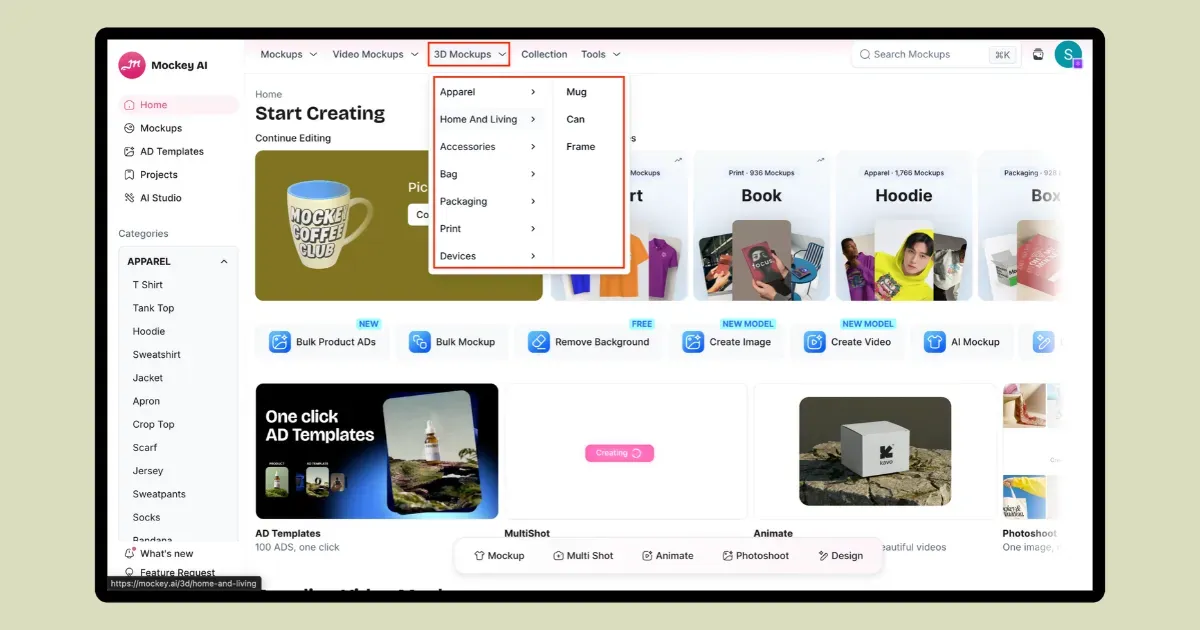
Here, we’ve selected the 3D mug template.
C. Upload Design, Change Product Color & Background
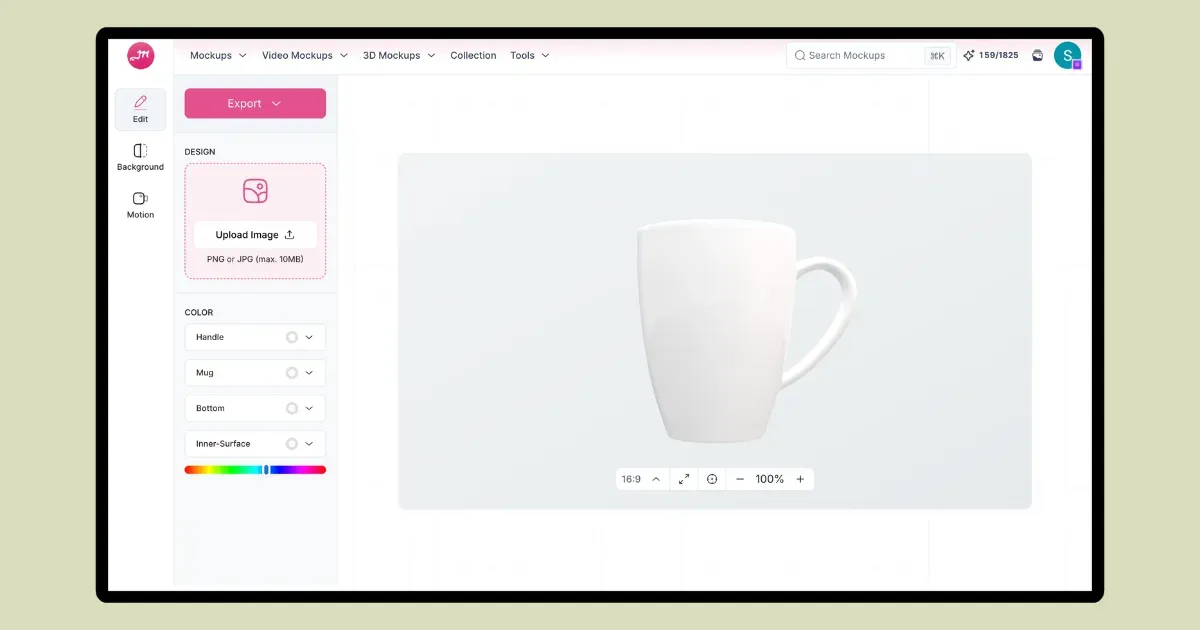
Now, upload your design and adjust it around the product. You can also change the product color or background if needed. Mockey offers custom, transparent, solid-color, and gradient background options.
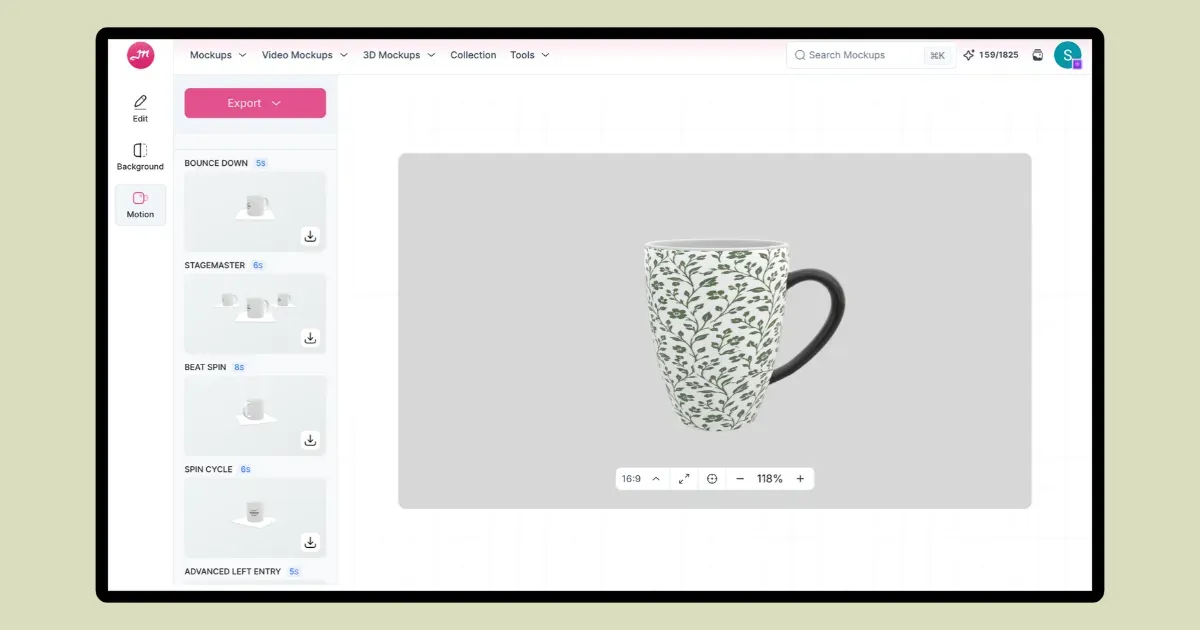
D. Select a Rotating Animation, Preview, and Download
There are more than 10 animation options to choose from. Select the rotating animation, preview it, and click the download arrow. Your mockup will be saved as an MP4 file with a 7-second duration.
Etsy adds a “video” badge to listings. It can make slow-moving products stand out without cutting your prices.
2. Showcase Multiple Products on One Shopify Page
Most Shopify visitors leave without buying when your page feels generic or static. Use Mockey’s 3D mockup to show texture, shine, and fit clearly. The steps remain the same. Create rotating product mockups for any product you wish, whether it’s a 3D T-shirt mockup or a 3D book mockup.
Add a looping 3D rotating mockup at the top. Customers can quickly see how each design looks from different angles.
Product Rotation Plan for Etsy vs. Shopify
Make catalog rotation a monthly routine instead of a manual, time-consuming task.
| Growth Lever | Etsy | Shopify |
|---|---|---|
| Goal | Get more clicks | Increase AOV |
| Rotation | Every 14–30 days | Every 30–45 days |
| Mockups | 360° spin video | Hover/rotating mockups |
| Slow Stock | Bundle with other products | Add to “Frequently Bought Together” |
How to Run a 4-Week Product Rotation
To cut holding costs and keep things moving, use this automated framework:
| Week | Action | What to Do |
|---|---|---|
| 1 | Audit | Identify the bottom 20% of products by revenue from the last 30 days. |
| 2 | Refresh | Create fresh 3D rotating mockups for them. |
| 3 | Swap | Update the listings and feature them on Etsy or Shopify. |
| 4 | Review | If sales rise, keep it. If sales stay slow, turn it into a variation of a top-selling bundle and use the traffic you already have. |
Conclusion
You understand how to create rotating product mockups. You don’t need complex 3D software. Tools like Mockey AI can wrap your flat designs onto 3D templates in seconds.
On Etsy, fresh visuals can help your listings stand out. Add a short 360° video to the listing. Shoppers can see the product from different sides, rather than relying on one still image.
FAQs
Can these animations slow down my website?
Large video files can slow down a Shopify page. Compress the video before uploading, and use WebM or WebP when they fit the job. Keeping short video loops around 3–5 MB can also help with loading speed.
Can I use 3D AI-generated mockup videos on Etsy?
Yes, Etsy allows listing videos. You can upload a short 360° product video to show different sides of the item. Etsy says videos can help listings appear in search and also improve visibility on Google, but it does not say that a 360° video gives a direct search-ranking boost.
Why does my design look blurry or warped when spinning?
The artwork can look wrong when the flat file and mockup template use different proportions. Check the template size before adding your design.

Sangram Sahoo
I’m a content writer with 4 years of experience. I specialize in creating practical content around mockups, print-on-demand, apparel, and e-commerce design.
